How to Verify Website Traffic Without Trusting a Screenshot
Quick answer: To verify website traffic, confirm control of the domain, read performance data from an authorized analytics source, match the property and reporting period, and keep the source, freshness date, and scope visible. A screenshot alone cannot establish ownership, recency, or whether filters were applied.
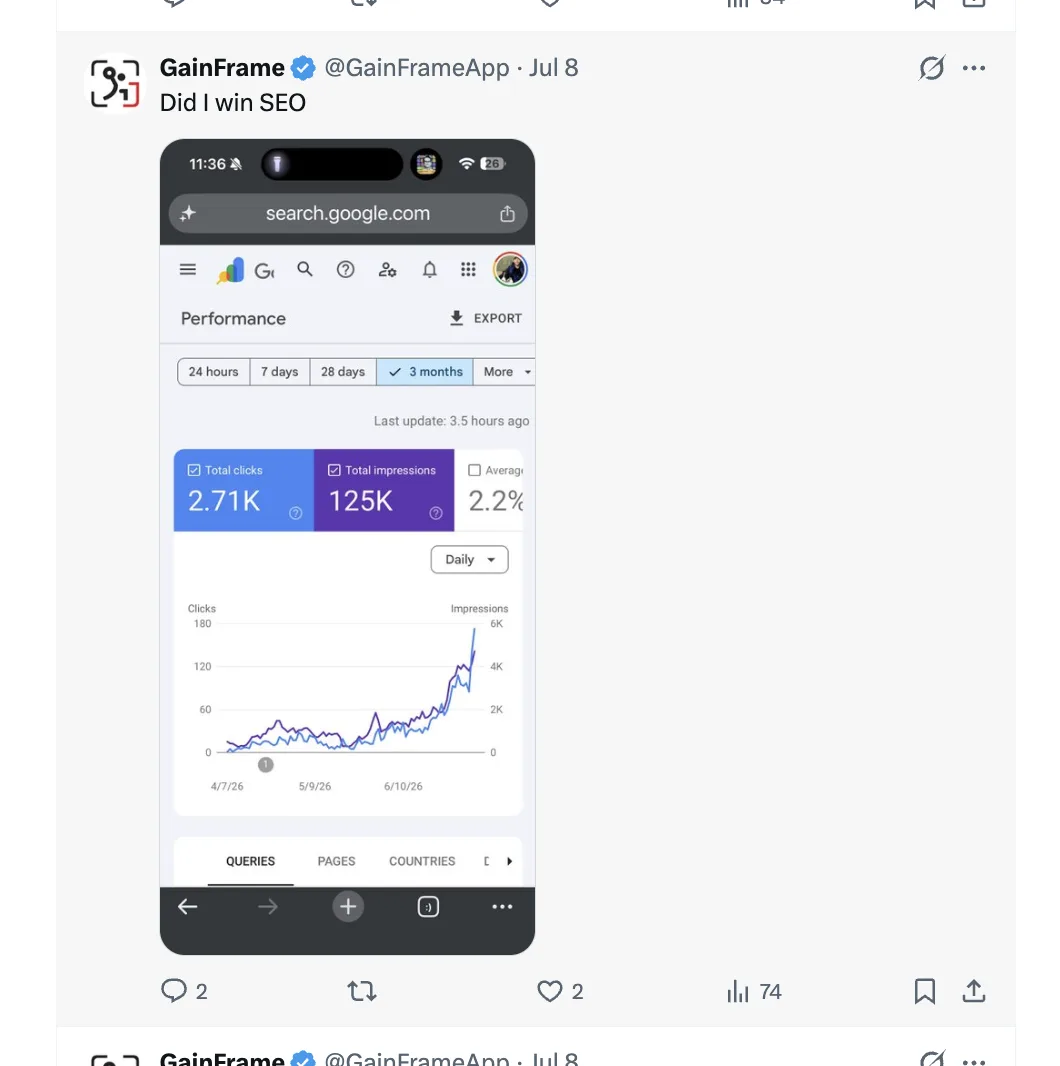
You see a post claiming 2.71K clicks and 125K impressions. The graph climbs sharply. It looks convincing. If you are trying to learn how to verify website traffic, however, the screenshot gives you the result without the chain of evidence behind it.
You cannot see whether the image belongs to the named site, whether the date range was changed, whether a filter removed inconvenient data, or whether the screenshot is six months old. The numbers might be completely honest. You still have to trust the person posting them.

What does verified website traffic actually mean?
Verification is not one checkmark. It is three separate questions: does the account have legitimate access to the property, did the number come from the named source, and is the reporting scope visible enough for someone else to understand the claim?
Property access
The connected account has owner or full-user access to the exact Search Console property being reported.
Source integrity
Clicks, impressions, CTR, and position are read from the authorized source rather than typed into a profile.
Reporting context
The date range, data-through date, filters, and refresh state stay attached to the figures.
Google distinguishes verified owners, delegated owners, full users, and restricted users. Those roles have different rights, so access should not be stretched into a broader claim about legal ownership. Google explains the distinction in its Search Console permissions documentation .
How can you verify website traffic step by step?
Use the same sequence whether you are checking your own site, reviewing an acquisition, or evaluating a founder's public traffic claim.
- 01
Confirm the property
Match the reported domain or URL-prefix property to the site being discussed and confirm the account has owner or full-user access.
- 02
Choose the source that matches the claim
Use Search Console for Google organic search performance and an on-site analytics tool for sessions, events, and conversions.
- 03
Record the reporting scope
Keep the date range, search type, filters, dimensions, and comparison period visible next to the number.
- 04
Read the data from the source
Use the source report or authorized API rather than accepting a manually typed total or a detached screenshot.
- 05
Show freshness and connection state
Publish the last synchronization time, data-through date, and a visible stale state if source access is revoked.
- 06
State what the data cannot prove
Separate search traffic from revenue, conversions, total site traffic, and any causal claim about why performance changed.
Why is a website traffic screenshot weak evidence?
A screenshot is a flattened output. It separates the number from the account, controls, and update state that produced it. Cropping can be harmless, especially on a phone, but it also removes the exact details needed to reproduce the claim.
Should you use Search Console or Google Analytics to verify traffic?
Use the source that matches the sentence you are trying to prove. Search Console is the better source for Google organic search visibility and clicks. An on-site analytics product is the better source for sessions, events, conversions, and behavior after arrival.
Google defines Search Console clicks, impressions, CTR, and average position in its Performance report guide . Google also notes that Search Console and Analytics can legitimately disagree because they collect and process different data.
How does SEO Receipts verify organic search traffic?
SEO Receipts asks for Google's read-only Search Console scope. After authorization, it lists properties where the account is an owner or full user. You choose what to publish, and the public receipt reads search performance from Google instead of accepting a typed number.
The Search Analytics API supports the read-only authorization scope and returns rows for a defined property and date range. Google warns that detailed results are bounded by internal limits and may include only top rows, which is why the receipt treats queries and pages as supporting detail rather than a complete export. See the official Search Analytics API reference .
Important limitation
Verified at the source does not mean verified beyond the source.
A Search Console receipt can support a claim about Google organic search performance. It cannot support a claim about revenue, profit, conversion quality, or total traffic from every channel.
What should you check before sharing website traffic?
- The domain or URL-prefix property matches the site
- The source matches the traffic claim
- The date range and comparison period are visible
- Filters and search type are disclosed
- The last sync and data-through dates are separate
- Revoked access creates a visible stale state
- Private queries and pages can remain hidden
- The limitations are written next to the proof
What are the limits of Search Console traffic verification?
Search Console is authoritative for what it reports, but it is not a raw ledger of every search or visitor. Google omits anonymized queries for privacy and stores only the most important detailed rows. Chart totals can therefore include traffic that never appears in the query table.
Freshness also matters. Google says collected performance data is normally available in two to three days, and newer data can remain preliminary. A public receipt should show the data-through date instead of implying that yesterday's final figures are already available. These limits are documented in Google's guide to Search Console data .
What else should you know about verifying website traffic?
Can you verify website traffic without access to the analytics account?
You can inspect public estimates from third-party tools, but you cannot independently verify exact private traffic without authorized access to the underlying analytics source. Estimates are useful for comparisons and research. They should not be presented as the site owner's measured traffic unless the source and methodology are clearly disclosed.
Does Google Search Console prove that someone owns a website?
A verified Search Console owner has proved control using a Google-supported verification method. A full user can view all Search Console data without being the verified owner. A trustworthy public record should distinguish those permissions and avoid treating account access as proof of legal ownership, company ownership, or authorship.
Can a Google Analytics screenshot verify website traffic?
A screenshot can document what appeared on a screen at one moment, but it does not independently prove the property, date range, filters, attribution settings, or freshness of the data. It becomes stronger supporting evidence when paired with account access, a reproducible report, and a public record that preserves those details.
Why do Search Console and Google Analytics report different numbers?
They measure different events. Search Console reports activity in Google Search, including clicks and impressions. Analytics measures behavior after a visitor reaches a tagged site. Consent, JavaScript, redirects, time zones, bots, attribution, and processing rules can all create legitimate differences between the two reports.
How fresh is Google Search Console performance data?
Google says collected Search Console data is normally available within two to three days. Recent values can be preliminary and may change while processing finishes. A verification page should therefore show both when it last synchronized and the final date represented in the report, rather than simply calling every number live.
What does a verified SEO traffic receipt not prove?
It does not prove revenue, profit, lead quality, conversions, or the business value of each click. It also cannot reveal every query because Search Console omits anonymized queries and limits some detailed rows. Verification strengthens a specific traffic claim. It does not turn that claim into a complete business audit.
What is the simplest website traffic verification rule to follow?
Use a three-part rule every time you publish or review a traffic number:
- 1. Name the claim. Say exactly what the number measures.
- 2. Preserve the source. Keep the property, period, and freshness attached.
- 3. State the boundary. Say what the evidence cannot prove.
The goal is not to distrust every screenshot. It is to make important traffic claims reproducible without requiring personal trust.
Put a source behind your SEO traffic.
Connect Google Search Console, choose a property, and review a report that refreshes from the source.
Connect Search Console